


Dragan Stamenkovic In addition to the current documentation, It would be helpful to have an example or a demo site of a complete functional implementation of Client Vault in a native wp environment and integration with key fluent suites plugins by (crm, booking, community, forms, player, cart). This will help with faster implementation of Client Vault, gain valuable ideas for best practices and let potential users see the practical value of Client Vault.

Hello everyone,
I hope you're all doing well today. I have some exciting surprises to share with you: a new update with features that I'm sure you'll love. These are actually features you requested, and I've implemented them in your Vault.
And the second surprise is another one, fulfilling some of your requests, and will be available immediately in the update announcements.
Do you have any idea what's coming? 🤔
🎉 Client Vault 2.0 is here — and honestly, I'm proud to show it to you
These past weeks, I've done almost nothing else: listening to your feedback, opening up the hood, and rebuilding whole parts of the vault. Many of you told me the same thing — "I love the idea, but I want it simpler to manage day to day, and nicer to show my clients." The 2.0 is my answer. And it's, by far, the biggest update since launch.
The headline is the agency vault. If you equip several clients, you know the pain: hunting for the right contract template, the latest brand guidelines, the up-to-date procedure… all scattered across emails and shared drives. Now you have a private library of your own, organized once and reusable everywhere, with its own admin space. You stop searching, and you save time on every case.
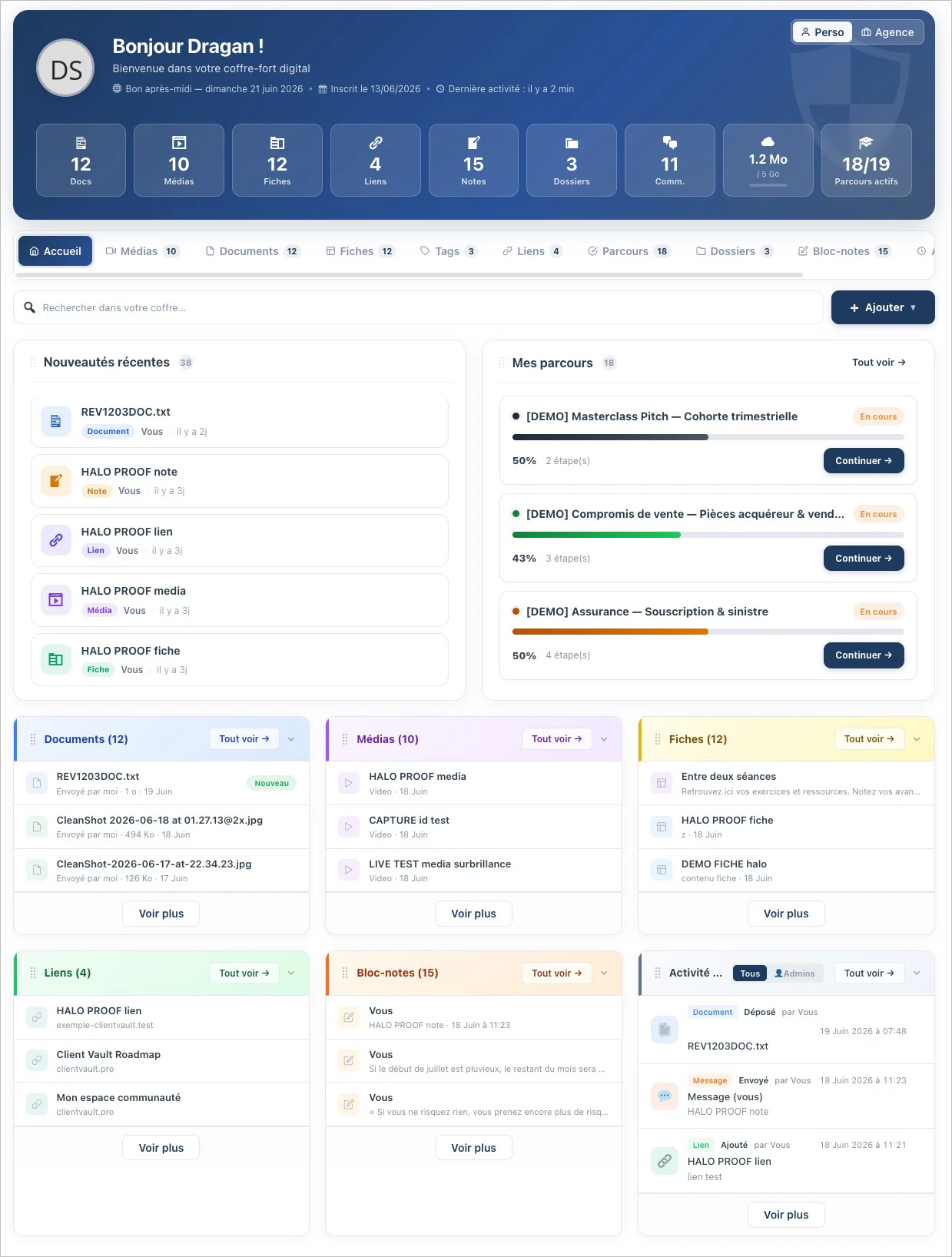
Next, the whole experience has been modernized — and not just on the client side: I carried the same comfort into the administration. List/Grid/Gallery views, filters that find a document in two seconds, editing without reloading, a unified preview with the discussion built in… In practice, you spend less time clicking, and the interface you show your clients finally reflects the quality of your work.
I also wanted to make sure nothing slips past you. A new activity feed, in plain language, tells you who did what and when — and a "Seen / Not seen" badge shows you what the client actually opened. Folders become real workspaces (every discussion in one place, one-click export). Journeys get stronger with document and form validation: your client gives their approval in one click, it's tracked, it's clean. And so you can sleep easy: automatic encrypted backups, full exports, and pro-grade security (cryptographic signing, anti-copy protection). All of it available in 17 languages.
And above all, what will never change: your data stays with you, on your server. No one else — me included — has access to it. That's the founding promise, and it's stronger than ever.
Thank you for being here, and thank you for your feedback — you're the ones moving this product forward. Let me know what you think 💙
Dragan
Full article : https://clientvault.pro/en/client-vault-2-0-revolutionize-your-client-tracking-achieve-powerful-results-for-each-client/
Changelog : https://clientvault.pro/changelog/

I would have liked to share the new version last night, Friday, Wednesday, or Monday, but to be honest, I'm exhausted. I need a good night's sleep to recover.
The last few days have been very intense, and I've been working on some exciting projects, but I underestimated the time they would take. However, I wanted to finish them properly, testing every possible scenario and delivering the best possible version to you.
It's a massive release coming tomorrow. It obviously doesn't change the core philosophy of Client Vault, but it will bring you so much more convenience and will also reveal the plugin's deeper vision and all the upcoming developments.
So, I'll see you tomorrow morning. I'll release this new version and take the opportunity to explain everything in detail. You'll see the changelog. It's very long :)
It was necessary to reach this version, which I finally consider to be at the level I wanted to share with you.
So, I'll see you tomorrow morning. Have a good evening, and see you tomorrow!
Dragan
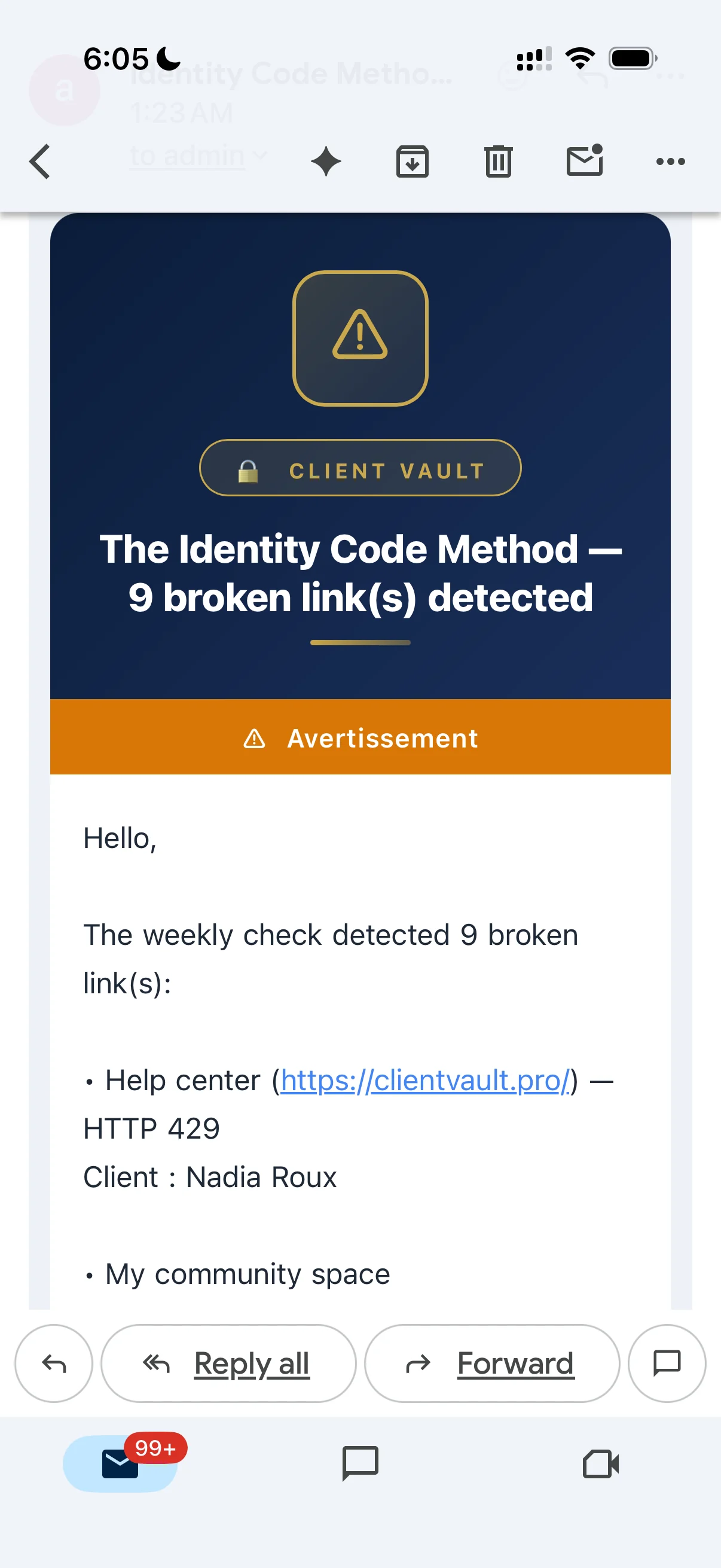
Dragan Stamenkovic i had installed the demo a few days ago and received this Google Translated “warning” in my email (image below):
- What is this about?
- How to correct these?
Thanks
Here's an update on the progress of the next update. I was hoping to release it today, or even yesterday, but the workload was just too much :)
I'll definitely finish it tomorrow. Here's a sneak peek at what's coming. This is by far the biggest ClientVault update I've ever made. The last few were already substantial, but compared to this one, it's night and day.
There are so many great things I want to share with you that will help you more than you think.
With ClientVault, I want to help you rethink your customer relationships while keeping your ecosystem secure, with your data safely stored on your server. I want ClientVault to be increasingly user-friendly, without compromising on security or customization.
I've been listening to you, and as usual, many of the upcoming new features have come from our discussions, your requests, or simply because they were planned in the roadmap and my vision for ClientVault.
So, I ask for just a little more patience. I'm truly sorry for announcing the release a bit too early. But I prefer to share an update when it's mature and has as few bugs as possible. But don't worry, tomorrow is the big day; it's a major one. I can even call it a version 2 for ClientVault.
And I promise, after this release, I'll finally be able to share some videos with you. There will be plenty to do.
I want to thank you again for your trust, your sharing, and your fantastic feedback, which helps improve ClientVault.
Have a wonderful evening, and see you tomorrow.
Take care of yourselves and your families.
Dragan
PS : By the way, do you have any idea what's going on?
Hey everyone 👋
These past few weeks, I've poured a ton of time into polishing Client Vault, and honestly, I think this is one of the best waves of updates we've ever shipped. I wanted to take two minutes to walk you through it — not as a cold list, but the way you'd chat with people who do the same job 🙂
Resume update : https://clientvault.pro/en/major-update-user-experience-and-ease-of-use-at-the-heart-of-your-vault/
And here's something that really matters to me before we dive in: a big part of these new features comes straight from the roadmap and from your requests. You share your ideas, your gaps, your "oh, if only it could…", and I turn them into features. In other words: you're building Client Vault with me. And that means a lot 🙏
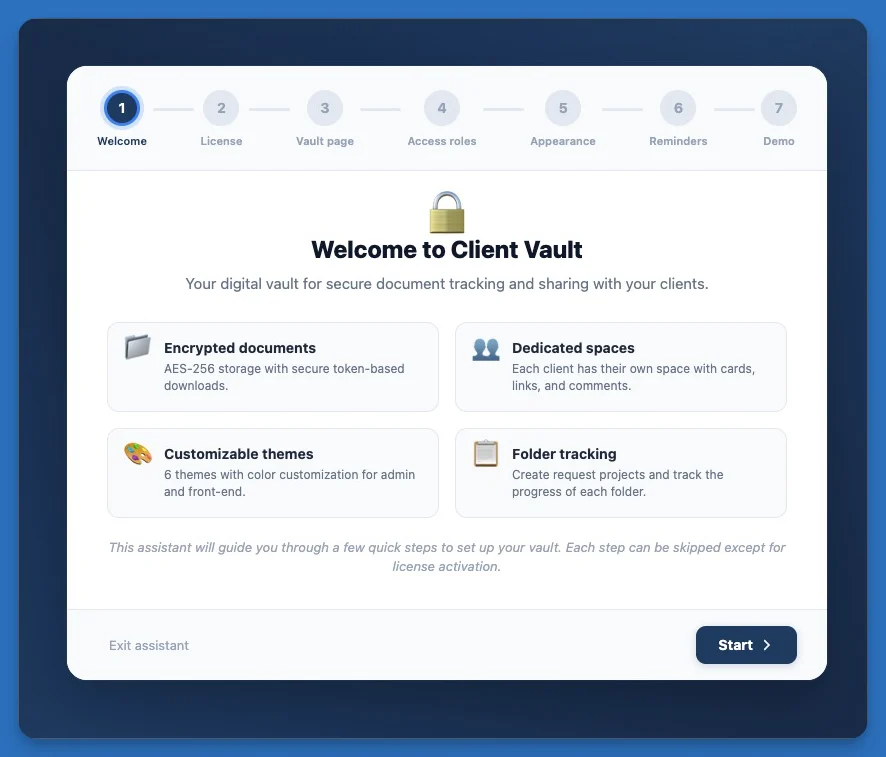
🪄 Getting started is now a breeze The new setup wizard takes you by the hand: license, client page, colors, access… everything is configured step by step. And my personal favorite in all of this: the demo by profession. You pick your trade — accountant, lawyer, notary, broker, coach, real estate, healthcare, training… — and Client Vault instantly fills up with a believable demonstration of your business: clients, files, journeys, safeguards… it's all there, alive. You can picture yourself in seconds, and it's brilliant for showing the tool to a prospect. You even choose the volume (light, standard or rich).
🧭 You're truly in control of your journeys
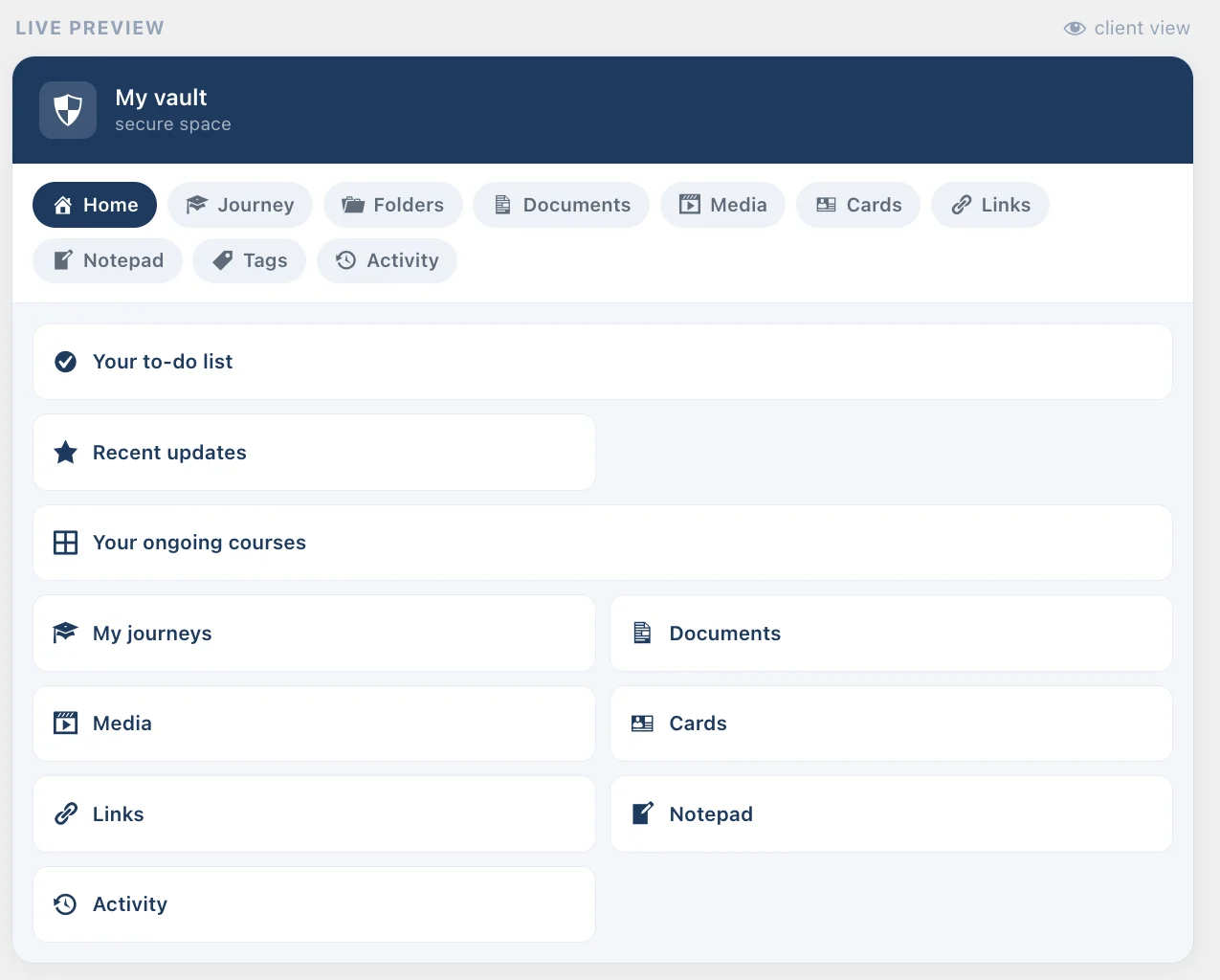
- You decide what each participant sees: the new "Access" tab lets you enable, hide and reorder a journey's menus, with a live preview.
- In a group, a member can become anonymous in a single click — their identity protected everywhere, while you still see the real person.
- You can pause a participant without removing them, close a one-on-one journey cleanly (and reopen it whenever you want), and preview a journey without skewing your stats.
✉️ Your clients kept in the loop, all on their own Enrollment, pause, resume, closing, removal, document requests… each step now triggers a clear, customizable email. Fewer manual follow-ups, more peace of mind.
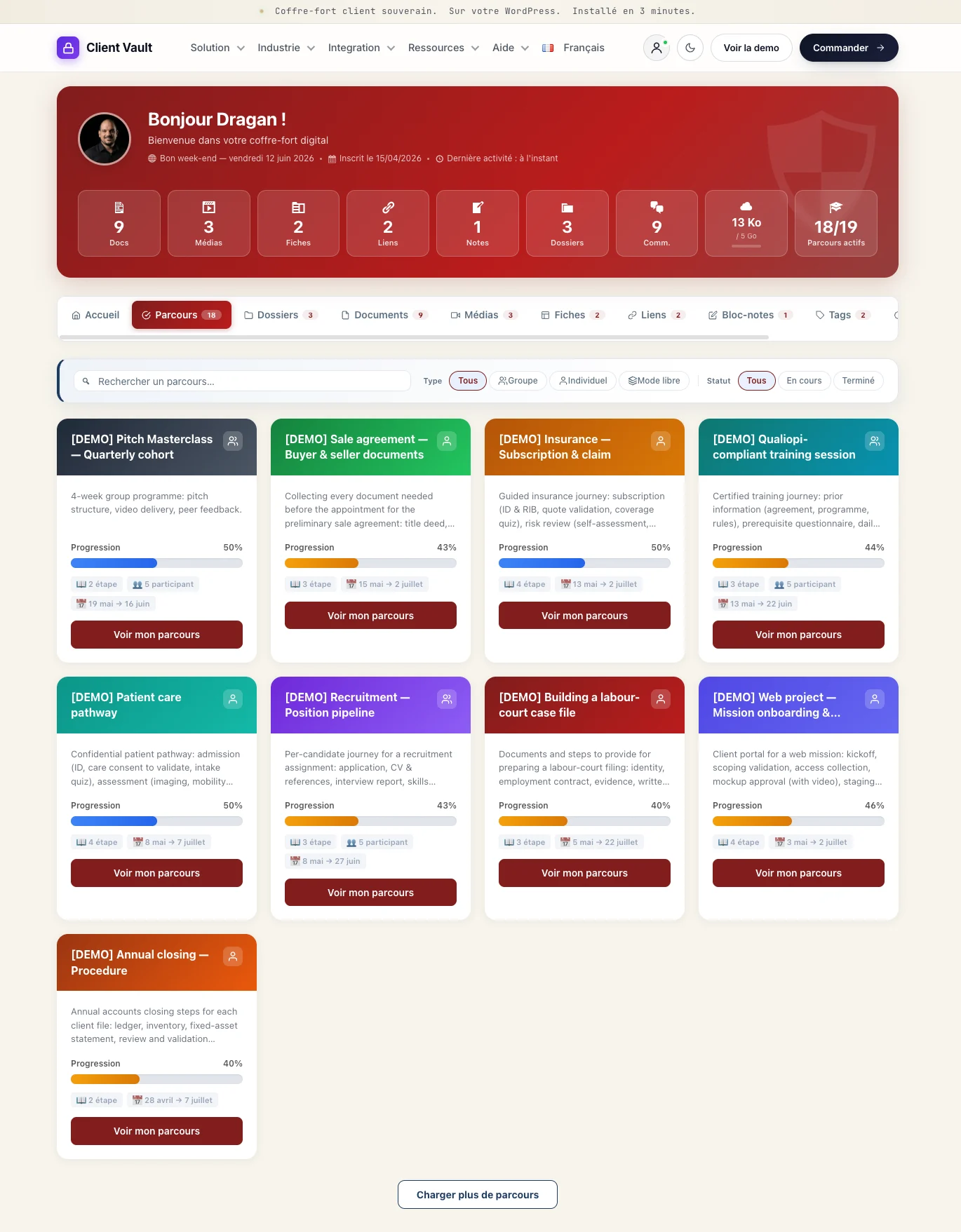
🌍 And all of it, in everyone's language We just wrapped up a big multilingual pass: 17 languages, from the client space to the emails and the setup wizard. Your clients are served in their own language, plain and simple.
…and alongside these headlines, there are dozens of small tweaks and fixes to make everything smoother, clearer and more solid day to day.
👉 The full details are on the changelog page: clientvault.pro/changelog/
Now it's your turn: launch the new demo for your profession and come tell me what you think 🙌 What do you love most? What's still missing for you? I read absolutely everything, and your feedback genuinely shapes where the product goes next — and the roadmap.
Because yes, I'll be completely transparent with you: what's coming in the next updates is going to be nothing short of extraordinary. 🤩 I already can't wait to show you… but I'll keep the surprise a little longer 😏 Stick around — you won't be disappointed.
Thank you for being here, it means the world 💜
— Dragan
https://prnt.sc/KbfNYrS46wK6 - Dashboard Settings link with incorrect URL
https://prnt.sc/3HAx3I7VlrCL - The filter defaults to Active even though it is set to "All Statuses"
https://prnt.sc/4f7knD2HAvxS - Translation
https://prnt.sc/rVjCkCrSRv3R & https://prnt.sc/c-owb7xXGoJM - When this is unchecked the black bar is still pressent just not with information. Remove the black bar conpletely when unchecked. It is helpful for admin to get back into the admin area when checking frontend
https://prnt.sc/zO3y1GXUkAkW - "I have placed the contract in your vault." What does this mean?
https://prnt.sc/gX6Z6BOcrYa1 vs https://prnt.sc/jV2kBz4SFHXT - Possible to use default fluentcommunity display with "locked key"? I like the wording in Client Vault but not the presentation! Also if possible to provide custom url choice to redirect.
As I am setting up Client Vault…I have a few more questions:
Q1 — Workshop facilitation via Client Vault:
Can the Client Vault Calendar + FluentBooking integration be used to manage free workshop registration and attendance tracking Or is Client Vault’s calendar intended for enrolled clients only?
Q2 — FluentBooking recurring event sync:
How does the FluentBooking integration work for recurring events? Can a single recurring FluentBooking calendar (e.g., weekly group coaching call) be linked to the Journey calendar so it appears automatically for all enrolled participants without manual entry per session?
Q3 — Role-based enrollment vs API enrollment:
When the FluentCRM automation assigns the Client User role, does Client Vault create the WordPress user account automatically if one does not exist?
Q4 — Fluent Forms quiz as step gate:
Can a Fluent Forms quiz be used as a hard gate on a Journey step — i.e., the client cannot mark a step complete or advance until the form/quiz is submitted? How is the submission linked to step progression?
Q5 — Multiple journeys per user:
Can a client be enrolled in more than one Program Journey simultaneously (e.g., a client in Program 1 who later enrolls in Program 2)? Does each role (Program 1 Client, Program 2 Client) give access to its own Journey independently?
Q6 — External data in portal:
Can custom FluentCRM field data (e.g. custom field data) be surfaced within the Client Vault portal — for example, displayed on the client’s Step 1 page as their starting reference data?
Thanks!
Debo
Dragan Stamenkovic I am still not clear how the integration between ClientVault and WP, Fluent Suite works....for example..if I have a client that is already registered on my site (wp user, in fluentcrm, in fluentcommunity taking courses, etc), how do I add them to ClientVault without having to delete (unique email) before becoming a client in ClientVault? Can I assign a tag/automation in fluentcrm that would make them ClientVault client without additional registration?