

Client Vault 2.0: Revolutionize your client tracking, achieve powerful results for each client!
🎉 Client Vault 2.0 is here — and honestly, I'm proud to show it to you
These past weeks, I've done almost nothing else: listening to your feedback, opening up the hood, and rebuilding whole parts of the vault. Many of you told me the same thing — "I love the idea, but I want it simpler to manage day to day, and nicer to show my clients." The 2.0 is my answer. And it's, by far, the biggest update since launch.
The headline is the agency vault. If you equip several clients, you know the pain: hunting for the right contract template, the latest brand guidelines, the up-to-date procedure… all scattered across emails and shared drives. Now you have a private library of your own, organized once and reusable everywhere, with its own admin space. You stop searching, and you save time on every case.
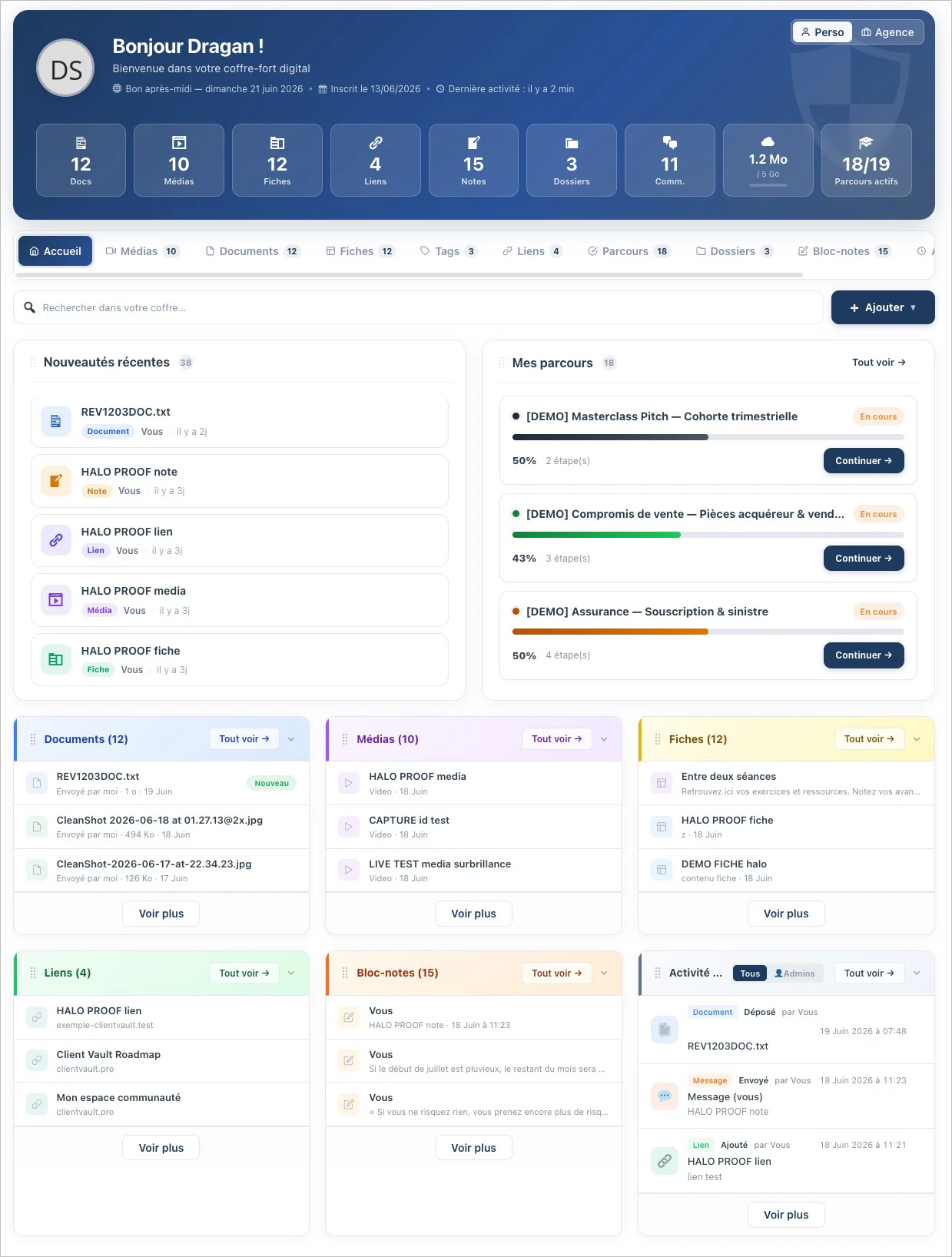
Next, the whole experience has been modernized — and not just on the client side: I carried the same comfort into the administration. List/Grid/Gallery views, filters that find a document in two seconds, editing without reloading, a unified preview with the discussion built in… In practice, you spend less time clicking, and the interface you show your clients finally reflects the quality of your work.
I also wanted to make sure nothing slips past you. A new activity feed, in plain language, tells you who did what and when — and a "Seen / Not seen" badge shows you what the client actually opened. Folders become real workspaces (every discussion in one place, one-click export). Journeys get stronger with document and form validation: your client gives their approval in one click, it's tracked, it's clean. And so you can sleep easy: automatic encrypted backups, full exports, and pro-grade security (cryptographic signing, anti-copy protection). All of it available in 17 languages.
And above all, what will never change: your data stays with you, on your server. No one else — me included — has access to it. That's the founding promise, and it's stronger than ever.
Thank you for being here, and thank you for your feedback — you're the ones moving this product forward. Let me know what you think 💙
Dragan
Full article : https://clientvault.pro/en/client-vault-2-0-revolutionize-your-client-tracking-achieve-powerful-results-for-each-client/
Changelog : https://clientvault.pro/changelog/

Dragan Stamenkovic awesome update! Thanks for your diligence and commitment...here are a few findings after update to the latest pro 20.00.000:
- Translation - appears during upgrade - https://prnt.sc/SMe9ChcPNRmm
- Creating the changelog inside admin plugin area is really tacky
- Dashboard display with text overflow - https://prnt.sc/Ob10v6lh3SCW
- Agency Dashboard (database error) - https://prnt.sc/2kny2_8ID2Sa
- Settings Demo page - https://prnt.sc/PF_dT8c-mvjh
- Access page - https://prnt.sc/TVR_BZG4__Pj
- Settings - > General - https://prnt.sc/wAUMjM8MY1B8
- Client Management Page with text overflow and spinning loading - https://prnt.sc/3Tnu_mEEGzuN
- The demo data is no longer available in my account..is this now integrated in the main plugin (CV)?
- Client facing page (my-vault) in fluentcommunity full width theme - https://prnt.sc/zw0vkj9H4O_o
- This would be nice - to add an indication on the dashboard whenever "demo data" is in use

1 - Translation - appears during upgrade
Okay, Ii will check.
2 - Creating the changelog inside the admin plugin area is really tricky
It already existed before, and I disagree. It's very important for understanding a client's action history.
3 - Dashboard display with text overflow
What is your screen resolution? I can't reproduce your problem.
4 - Agency Dashboard (database error)
Please submit a support ticket for this and detail the context of your error.
5 - Settings Demo page
What is your screen resolution? I can't reproduce your problem.
6 - Access page
What is the problem?
7 - Settings -> General
What is the problem?
8 - Client Management Page with text overflow and spinning loading
Do you have any clients installed on your vault? I can't reproduce your mistake.
9 - The data is always available either in the demo tab in the settings or from the installation wizard. If you've already installed demo data, this step will be skipped.
10 - This is a problem with the Fluent Community theme. You need to resolve the issue with them. You'll have to modify the CSS.
11 - There's no need to do this because you already know you've installed demo data. It's an option you select and it's not automatic. So you need to remember it. Alternatively, you can find out in several other ways: either in the various demo settings. It will be indicated there. Or in the list of clients who will have dummy emails with xxx@@cvdd.demo
Dragan Stamenkovic Thanks....
for #2 ...I have recorded a screencast of what I refer to - https://www.awesomescreenshot.com/video/53862454?key=d543c46fc27ec9d30756fee657194c23 It is not needed to have the entire changelog open in the plugins area. This links https://prnt.sc/RtpxDLISQSPh are sufficient for this area.
3, 5. Screen resolution is 2880 x 1800
4. 9, 10. okay
6, 7. Very poor UI
8. I have demo data installed.
11. Just a UX improvement suggestion - visual reminder
Debo Ogunrinde
I understand, but not everyone reacts like you. Some people like to read the changelog here. I agree, this one is exceptionally long. It's not usually like that.
As for the rest, make sure you have the latest version of the plugin as well as the companion plugin. Regarding Client Vault, don't worry if you don't have the same version, as the one I use hasn't been released yet. It's coming very soon with bug fixes and two great new features for Fluent CRM users.
Thanks you for your feedback !
Dragan Stamenkovic thanks, that’s fantastic…will look forward to it…