

Feature Suggestions and Bug Reports for the Blog & Collection Extension
First of all, thank you for the latest update! It’s working great, and I really appreciate the work you’re doing on this extension. I’d like to share a few suggestions and report some issues that could make it even better.
1. Hide Article and Taxonomy Counts
It would be helpful to have options to hide the total article count, taxonomy counts, and other numerical indicators displayed throughout the extension. This would give administrators more control over the interface and allow for a cleaner design.
2. Issue with “Show the sources in tabs”
Under The Look settings, the “Show the sources in tabs” feature doesn’t seem to work when the tab names are written in Bangla. It would be great if this could support non-English languages properly.
3. Default Collapsed State for “In this article”
On single article pages, would it be possible to make the “In this article” section collapsed by default on desktop? This could help keep long travel guides more compact and improve the reading experience. Ideally, users should still be able to expand it whenever they want.
4. Search Box Active Color
The active or focus color of the article search box in Blog & Collection doesn’t appear correctly. Please consider fixing this so the search field displays its intended active color consistently.
5. Internal Links Redirecting to WordPress Pages
I’ve noticed an issue with internal links. Some links work correctly within the community interface, but others redirect users to the regular WordPress pages outside the community. I’ve particularly encountered this issue with Bangla content.
It would be great if internal links could consistently open within the community interface, regardless of the language used in the content.
6. Support for Travel Guide Articles and a Community-Based Website Structure
Since my website is a travel website, I’d also like to ask whether Blog & Collection could support publishing comprehensive travel guides for different destinations, including detailed articles, images, and useful internal links.
More importantly, would it be possible to use the community as the main website at website.com, instead of keeping it under website.com/community?
My goal is to display all my WordPress articles through the community interface rather than using the theme’s traditional single-post and archive layouts, while retaining WordPress as the content management system.
Google indexing and SEO are especially important to me. I want Google to crawl and index the articles properly, with their own URLs, titles, meta descriptions, and structured data where appropriate.
Would this type of setup be possible with the current extension, or would it require additional development? If it is possible, I’d appreciate your recommendations on the best way to implement it without compromising SEO.
Thank you again for your excellent work. I believe these improvements would make Blog & Collection even more powerful, especially for multilingual websites and content-focused platforms like travel websites. I look forward to hearing your thoughts!

Similar to the Directory feature, would it be possible to allow community members to publish articles directly? I’m referring to long-form content such as travel guides, travel tips, travel stories, and destination guides, rather than regular community posts. It would be great if members could contribute articles in a dedicated format, making the community more like a collaborative travel magazine.

Thank you so much for this detailed feedback, and I’m glad the latest update is working well for you! Here’s where each point stands:
1. Hiding counts – I’d prefer to keep the counts. For most readers they’re useful: they show at a glance how much content each collection, tab or category holds. If you’d like a cleaner look on your site, a few lines of custom CSS can hide them.
2. Tabs in Bangla – This comes from the Bangla script. Blog & Collections is designed for languages written in the Latin alphabet, and non-Latin scripts (Bangla, but also Chinese, Russian, Arabic…) aren’t supported for the moment. With tab names in the Latin alphabet, tabs work normally.
3. “In this article” collapsed on desktop – I’d rather keep it open on desktop, and that’s a deliberate choice. On a large screen there’s room for it in the sidebar, so it stays visible while you read and lets readers jump to any section of a long guide in one click. On mobile, where space is limited, it’s already collapsed by default. If you’d rather not show it, you can turn it off for each collection in “The look” (“Contents of long articles”). You can also choose how many headings an article needs before the table of contents appears.
4. Search box active color – Confirmed: the search field doesn’t have a proper active style at the moment. This will be fixed in the next update.
5. Internal links – This one is also related to Bangla URLs. Links to articles whose URL is in the Latin alphabet open inside the community, as long as the article belongs to a collection. URLs in non-Latin scripts aren’t supported for the moment.
6. Travel guides and SEO – Good news: travel guides already work with Blog & Collections. A guide is simply a WordPress article, with images, a table of contents, series and internal links. For SEO, it helps to see how Blog & Collections fits into the ecosystem: it works with WordPress, it doesn’t replace it. Your articles remain WordPress articles, with their own URLs, and WordPress (with Yoast or Rank Math) handles their SEO: titles, meta descriptions, structured data. The community gives your members another way to read them. It isn’t meant to be indexed instead of your articles, since Google already knows them. As for placing the community at the root of your domain, that’s a Fluent Community setting, not a Blog & Collections one.
7. Member-submitted articles – This is already possible with Fluent Forms, which can create WordPress posts from a form. Once a submitted article is published in a category included in one of your collections, it appears in the community automatically.
Thanks again, feedback like this from a multilingual, content-focused site is really valuable!
Merci beaucoup pour ce retour détaillé, et je suis ravi que la dernière mise à jour fonctionne bien chez vous ! Voici où en est chaque point :
1. Masquer les nombres – Je préfère garder les nombres. Pour la plupart des lecteurs, ils sont utiles : ils montrent d’un coup d’œil combien de contenus contient chaque collection, onglet ou catégorie. Si vous voulez une présentation plus épurée sur votre site, quelques lignes de CSS personnalisé suffisent pour les masquer.
2. Onglets en bangla – Ce comportement vient de l’alphabet bangla. Blog et collections est conçu pour les langues en alphabet latin, et les alphabets non latins (bangla, mais aussi chinois, russe, arabe…) ne sont pas pris en charge pour le moment. Avec des noms d’onglets en alphabet latin, l’affichage en onglets fonctionne normalement.
3. « Dans cet article » replié sur ordinateur – Je préfère le garder ouvert sur ordinateur, et c’est un choix voulu. Sur un grand écran, il y a de la place dans la colonne de côté : le sommaire reste visible pendant la lecture et permet d’aller à n’importe quelle partie d’un long guide en un clic. Sur mobile, où la place manque, il est déjà replié par défaut. Si vous préférez ne pas l’afficher, vous pouvez le désactiver pour chaque collection dans la fenêtre « La présentation » (« Sommaire des longs articles »). Vous pouvez aussi choisir le nombre de titres qu’un article doit avoir pour que le sommaire apparaisse.
4. Couleur active de la recherche – C’est confirmé : le champ de recherche n’a pas de vrai style actif pour l’instant. Ce sera corrigé dans la prochaine mise à jour.
5. Liens internes – Là aussi, c’est lié aux adresses écrites en bangla. Les liens vers des articles dont l’adresse est en alphabet latin s’ouvrent bien dans la communauté, à condition que l’article fasse partie d’une collection. Les adresses en alphabet non latin ne sont pas prises en charge pour le moment.
6. Guides de voyage et SEO – Bonne nouvelle : les guides de voyage fonctionnent déjà avec Blog et collections. Un guide est simplement un article WordPress, avec images, sommaire, séries et liens internes. Pour le référencement, il faut comprendre comment Blog et collections s’inscrit dans l’écosystème : il fonctionne avec WordPress et ne le remplace pas. Vos articles restent des articles WordPress, avec leurs propres adresses, et c’est WordPress (avec Yoast ou Rank Math) qui s’occupe de leur référencement : titres, meta descriptions, données structurées. La communauté offre une autre façon de les lire à vos membres. Elle n’a pas vocation à être indexée à la place de vos articles, puisque Google connaît déjà ces articles. Quant à placer la communauté à la racine de votre domaine, cela relève des réglages de Fluent Community, pas de Blog et collections.
7. Articles proposés par les membres – C’est déjà possible avec Fluent Forms, qui peut créer des articles WordPress à partir d’un formulaire. Dès qu’un article proposé est publié dans une catégorie reprise par l’une de vos collections, il apparaît automatiquement dans la communauté.
Merci encore : un retour comme le vôtre, venant d’un site multilingue centré sur le contenu, est vraiment précieux !
Arif Hi! Thanks again for your detailed feedback, it really helped. Blog & Collections 1.8.1 is now available, with three fixes:
- Tabs named in Bangla, or in any other non-Latin script, now open and keep their address.
- The search field now shows its active color.
- Links to your articles, written with or without “www.”, now open in the community.
I tested links to articles with Bangla URLs in every form, and they all open in the community. If some of your links still send readers to the WordPress page after the update, please let me know and send me one or two of them. The cause must be something else, and I’d be happy to look into it with you.
Dragan Stamenkovic Wow, this is working amazingly well! Thank you so much for your excellent work. I really appreciate your effort! I’d love to share a few more suggestions and help identify any inconsistencies or issues I come across so we can make it even better.
I have a few more suggestions and issues regarding the Blog & Collections extension:
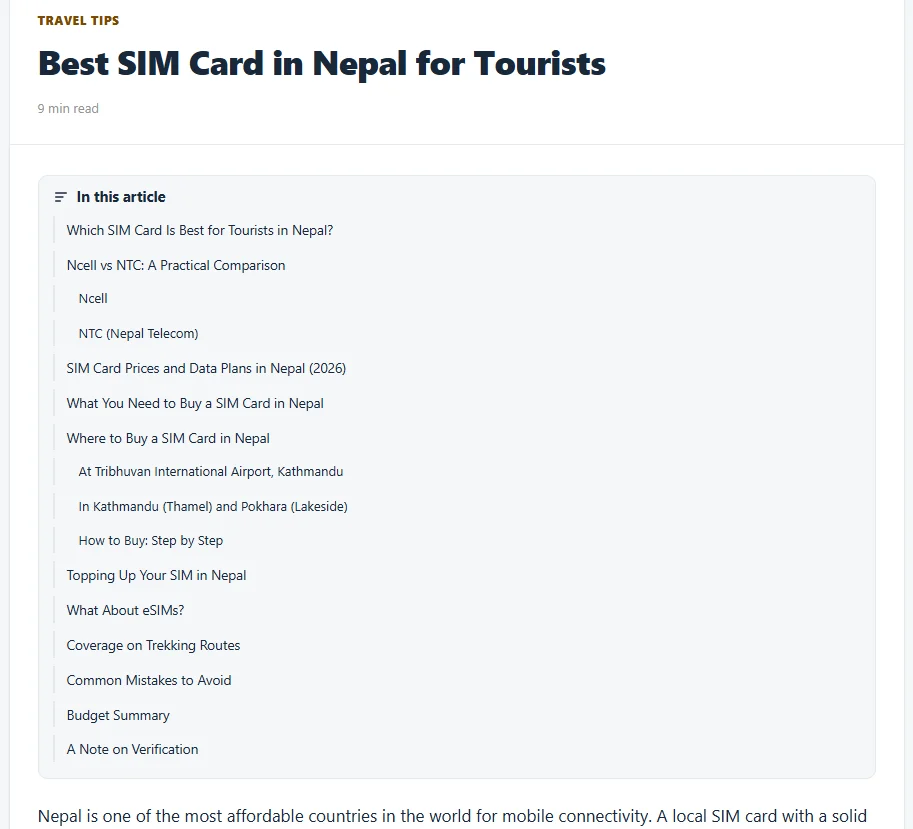
- “In this article” section: It takes up a lot of space at the beginning of an article. Could its size be reduced or could it be collapsed by default?
- Bullet lists: Bullet points are not displayed correctly in articles. Could you please fix this?
- Collections label on mobile: On responsive layouts, the Collections icon appears differently. Would it be possible to display the Collections name next to its icon while keeping the design compact and avoiding unnecessary space on mobile screens?
- Color customization: How can I change the colors of Blog & Collections to match my theme’s color scheme? It would be great to have dedicated color customization options.
- “Pick up where you stopped”: This section doesn’t display properly on smaller screens and mobile devices. Could you improve its responsive layout?
- Lightbox for article images: Could you add a lightbox feature so users can click on images within single articles to view them in a larger overlay?
- Global Search across the entire WordPress website: Is it possible to display the Global Search feature throughout the entire WordPress website, including regular WordPress pages and posts outside the community? It would be great to have a unified search experience across the whole site.
One more thing: I’ve also implemented some additional features for Fluent Messaging using custom code, including message read receipts, an online status indicator, and a list of currently active users in the messaging interface. Additionally, I’ve implemented audio and video calling using Cloudflare Realtime, also through custom code, and both features are working.
If you’re interested, I’d be happy to share the two code implementations with you. Perhaps you could use them as a starting point to develop dedicated extensions for these features, making them easier for other users to implement and maintain.
Thank you again for your excellent work and for continuously improving the platform!