

The migration of your licenses without extra cost is now active (+ BONUS)
Hello everyone,
A French saying goes that only fools never change their minds 🙂
I talk with you every day, with this growing community, and I learn something new every day.
I have a clear vision for Client Vault, and I know full well that I can't use the same methods as other popular plugins. And above all, I don't want to, because Client Vault has its own identity, and I have my own philosophy for this plugin, whether it's in terms of vision, innovations, or even the relationship I have with my clients.
However, I don't say I'm right about everything, and that's why I question myself every day:
- on every request you make
- on every testimonial you share with me
- on every idea you suggest
- on every problem you point out.
I take everything into consideration, and obviously, I have to make choices, but please believe me, I listen to you and pay close attention. Each of your requests, each of your reactions, is valuable for the development of Client Vault.
One request has come up regularly, almost by the majority recently, and that's the ability to upgrade one's license. I believe that a customer who purchases a license does so with full responsibility. Given the launch offer and the numerous advantages, I think the customer also makes the decision regarding their license choice.
And in this spirit of responsibility, that's also why I didn't allow license upgrades. The second point is that I can't afford to use the same techniques as the big publishers. I'm still very small in comparison, and what a large publisher can do with its financial resources, I can't necessarily do on the scale of Client Vault.
It's not a question of being right or wrong, because in this situation, all arguments are valid, whether they're from your side or mine. As I've always told you, we're building Client Vault together, and your opinion will always be important.
And I don't appreciate deadlocks, because ultimately, no one is satisfied.
That's why, after telling you privately that license migration wasn't available, I've decided to change my mind and offer this option for all plans.
And since this is an important decision, it will remain active going forward.
So, of course, it will only be available for current plans. Currently, migration is only available for launch plans. And when this launch period ends, migration will be possible for current plans. There's no going back.
And since I never do things halfway, and I want you to succeed with Client Vault and also make money selling it to your clients, I need to do more for you.
We're in the launch phase, and it's not just about money; it's also about building trust in the future and demonstrating the value of my actions.
So, in addition to the option to migrate from one plan to another, I also want you to purchase significantly more licenses, especially during this launch period. I've activated a special migration discount. So, here's how it works.
- Annual Solo License -> Lifetime License
- Annual PRO License -> 5 sites / 15 sites / 50 sites
- Lifetime PRO License 1 site -> Lifetime PRO License 10 sites + 5% discount
- Lifetime PRO License 10 sites -> Lifetime PRO License 30 sites + 15% discount
- Lifetime PRO License 30 sites -> Lifetime PRO License 100 sites + 20% discount
- Lifetime PRO License 30 sites (split payment) -> Lifetime PRO License 100 sites (split) + 10% discount
Of course, the price is prorated, and you'll only pay the difference, plus you'll get an additional discount.
So, if you support Client Vault, it's also a way to contribute to the plugin's development and help make it even better. So, if you've been wanting to upgrade your package, you can now do so at a lower cost, while also benefiting from a discount. And if you'd like to upgrade your tier (which I highly recommend), it will be even more advantageous.
These offers are only available during the launch period, which is ending soon. So, take advantage of it. Don't hesitate.
This is my way of letting you know that I hear you, that I understand you, and that I'm also open to changing my mind. This isn't about ego or some over-optimized sales strategy. Sometimes, discussing this with so many of you makes me realize that there's a real need on your end. It's not a financial calculation; it's simply common sense. After all, we support each other as both merchants and customers, and we owe it to each other to listen.
I hope you appreciate this gesture. To complete the migration, go to your account, under the "Subscription" tab, where you can also upgrade your plan.
I'll see you very soon, because there's also a new update coming today with other surprises inside. Stay tuned!
Dragan
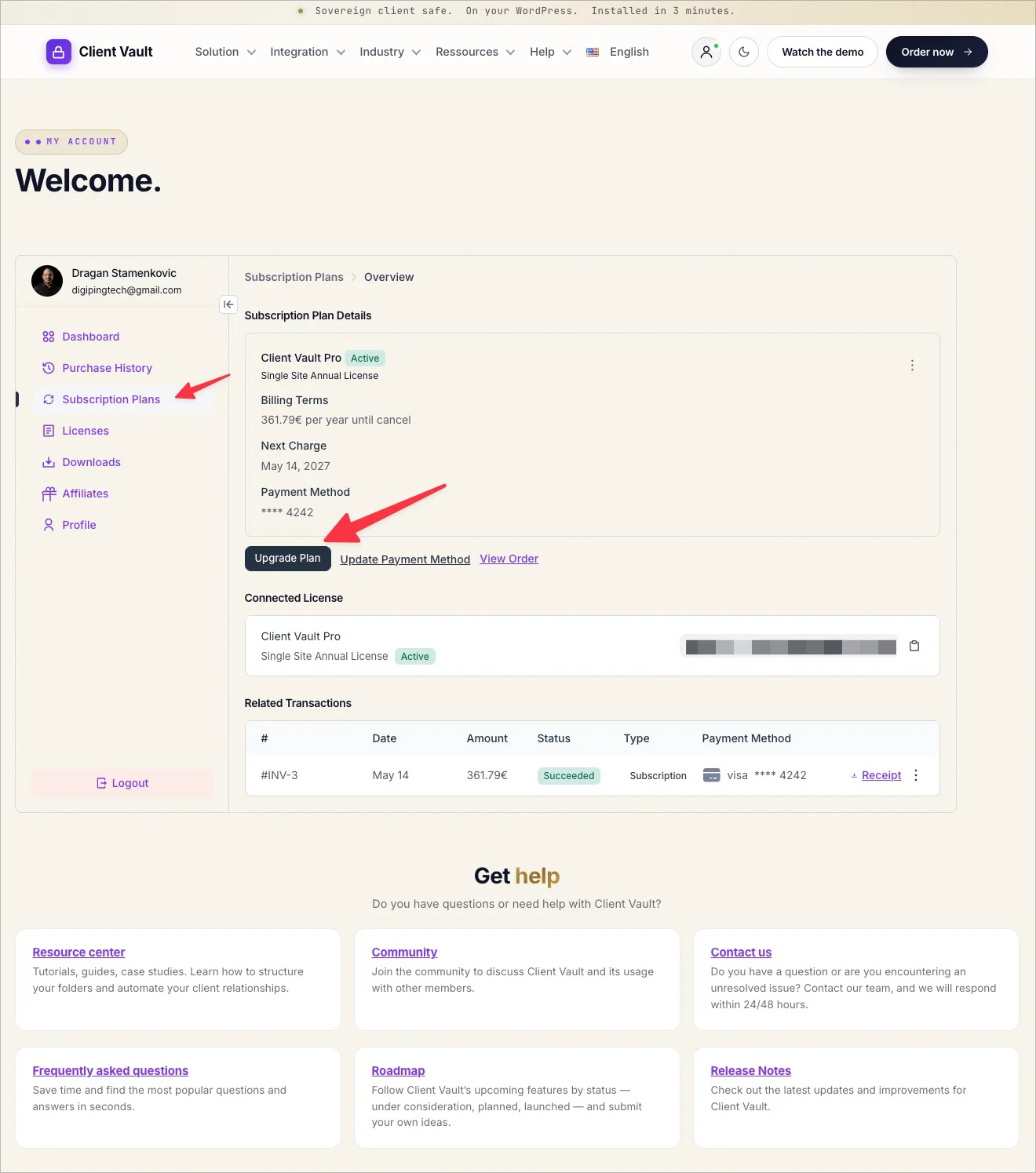


Dragan Stamenkovic Thank you! The “Subscription” menu is not showing in my account…

Debo Ogunrinde However, everything is enabled. I've cleared the website's cache. That could be the problem. Could you try again on your end, also clearing your browser's cache?
Debo Ogunrinde If that doesn't work, please open a ticket and we'll look into the problem privately.
Dragan Stamenkovic opened the ticket…thanks
Debo Ogunrinde Answered in the ticket. The way it works is a little different because Lifetime offers are not considered subscriptions, even if they are unlimited subscriptions. Here's how it works
1. Accessing the current license
The customer logs into their Customer Dashboard on your site. Since they don't have a subscription, they ignore the "Subscriptions" tab and go directly to the Licenses (or Purchase History, depending on your menu configuration) tab. They then click on "View" next to their Lifetime PRO License 1 site order.
2. Triggering the Upgrade
On the details page, right next to their activation key and usage limit (1/1 site), FluentCart will automatically display an Upgrade License button. This button is natively generated because the system detects that an Upgrade Path has been configured for this product variation.
3. The discounted checkout
By clicking this button, a popup asks them to choose the desired higher tier (e.g., 10 sites). They are then redirected to your site's checkout page.
This is where your mathematical settings come into play, completely seamlessly for them:
- The cart displays the price of the 10-site plan (999).
- FluentCart automatically applies the flat-rate deduction (the Discount Amount of 619 that you configured).
- The customer sees a net total to pay of 380. They complete the transaction via credit card or PayPal.
4. Instant quota update
As soon as the payment is validated, the technical magic happens in the background:
- The customer's license key remains exactly the same. They don't need to log into their WordPress site to replace the old key.
- The database quota (Activation Limit) instantly increases from 1 to 10 sites.
- In their customer dashboard, the "1 site" mention is instantly replaced by "10 sites".
Dragan Stamenkovic upgraded!
Debo Ogunrinde Thank you for your trust 🙏