

Content protection: downloads are permitted
In your latest update, you mentioned that Collections would include "content protection features, specifically making files non-downloadable and adding a traceable, personalized watermark."
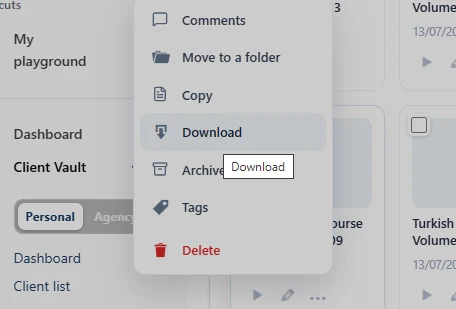
This is a feature I'm very interested in. However, I can still download the files I see in my own Vault (personal account).
I'm still a bit unclear on how the Personal view works... does it represent the same experience that a client would have when accessing a Collection, or does the account owner have different permissions?

In the settings for each collection, you can activate the security settings. Here's what you'll be able to do:
Content stream protection:
- No exposed file URLs: everything goes through a streaming endpoint with an HMAC-SHA256 signed token (content + user + 3-hour expiration)
- Access re-verification on every request: revoked access immediately cuts the stream, even with a still-valid token
- Files decrypted on the fly from the encrypted vault (AES-256), with integrity checks (an altered file is not served) and anti-traversal protection
- Anti-hotlink: External Referer/Origin → 403, stream cannot be played from another site
Personalized watermark for each viewer
- Overlay with name / email / hashed ID / date of the logged-in viewer, on video, image, and PDF — each viewer only sees their own watermark, so a screenshot is traceable
- Enabled per Collection, with selectable fields Displayed
Anti-downloading
- Video/audio: download button removed, picture-in-picture disabled
- Images: right-click blocked, drag-and-drop disabled
- PDF: toolbar hidden (no download/print button)
Access control by section
- Dedicated access table (client × section), granting of "entire Collection" or section by section
- Granting triggers: FluentCart purchase (automatic grant, revoked upon refund), FluentCRM tag, manual grant, API — but access status remains held by Client Vault (sovereignty)
- Locked sections are displayed with a teaser + purchase CTA, but their content is never sent to the browser
Privacy and traceability
- Anonymization by participant: name, avatar, and link hidden throughout the front end (comments, activity, rankings); The admin and the user always see the real name.
- Every content access is logged (who, what, when) — based on analytics and GDPR compliant logs.
API
- REST Collection routes reserved for admins, which only reference existing objects in the vault (no arbitrary creation), with import idempotence.
Regarding downloading, you can do it because you are logged in as an administrator or manager who has the ability to administer the vault.
for resume, Client Vault delivers the highest level of security a self-hosted vault can achieve.
Encryption at rest, signed streams, instant revocation, viewer-specific watermarking, a tamper-proof audit log — everything that can be done on your own server, we do. And not just for videos: your PDFs, documents, images and audio files are protected to the same standard. That's the difference with video platforms.
So what about DRM? Let's be upfront. Hardware DRM requires heavy infrastructure and recurring costs that a standard WordPress server simply cannot handle. Building it natively into Client Vault would have meant charging you a premium for an overengineered machine — the cost/benefit ratio just doesn't justify it. So we did something smarter: if your video content calls for it, plug in FluentPlayer — and Client Vault is, to this day, the only plugin that natively supports FluentPlayer videos. The best of both worlds, with zero compromise on your independence.
Full transparency: zero risk doesn't exist. Content from Netflix, Apple TV+ or Prime — protected by the most expensive DRM in the world — is circulating everywhere within 24 hours of release. Someone truly determined will always find a way. Anyone who promises you otherwise is lying to you.
But here's the reality: those people are a tiny fraction. For everyone else — meaning the overwhelming majority of your clients — Client Vault's security does exactly what it's supposed to do: it protects, it deters, and it traces. Whoever leaks a piece of content leaves their name watermarked on it.
And there's the benefit nobody talks about enough: your image. A secure space, a protected player, a watermark bearing their name — your client feels it from the very first login: they're dealing with a professional. This security doesn't just protect your content — it elevates your positioning.
Thank you for your reply Dragan. Could you show what a viewer’s watermark would look like on a leaked video? Wouldn’t that look like the video belongs to them instead? Just trying to understand the way that works and what it looks like. :)